What do you mean by BIMI Generator?
Our free BIMI generator quickly creates your BIMI record. Just enter your details, and we will handle the rest.
BIMI: What is it?
BIMI (Brand Indicators For Message Identification) lets businesses display their logo next to emails they send.
Once you create your BIMI record, simply add it to your domain’s DNS to improve your brand’s visibility in emails.


Why use the BIMI Generator?
Our BIMI generator makes it easy to set up BIMI for better brand visibility in emails.
Benefits -
✓ Improve email marketing
✓ Display visuals in emails
✓ Ensure BIMI compliance
✓ Enhance security and authentication
BIMI helps email providers and customers confirm your emails are real.
Create your BIMI record todayWays to use the BIMI generator
Type your domain name
This is the domain that your company uses to send emails (for example, fareof.net).
Add your logo’s url (SVG format)
Paste the link to your logo image. BIMI demands that it be in SVG format. Check the BIMI logo guidelines for more information.
Add your VMC url (optional)
If you have a verified mark certificate (VMC), please enter its link belowge.
Note: some email providers, like Gmail, require a VMC, while others do not. Its is best to include one to confirm you own the logo’s trademark.
BIMI logo requirements
Your company logo is a key part of your BIMI record. To display properly, it must meet these standards:
- ✓ Square shape (1:1 ratio)
- ✓ At least 96*96 pixels (exact dimensions required)
- ✓ File size: 32 KB or smaller
- ✓ Solid color background (recommended)
- ✓ No external links or scripts
- ✓ Must include a title tag
- ✓ Format: SVG tiny PS
For the best results, use a design tool like Adobe Illustrator to create or adjust your logo. You can also check the BIMI group’s recommended SVG conversion tools for help.
How to set up your BIMI record
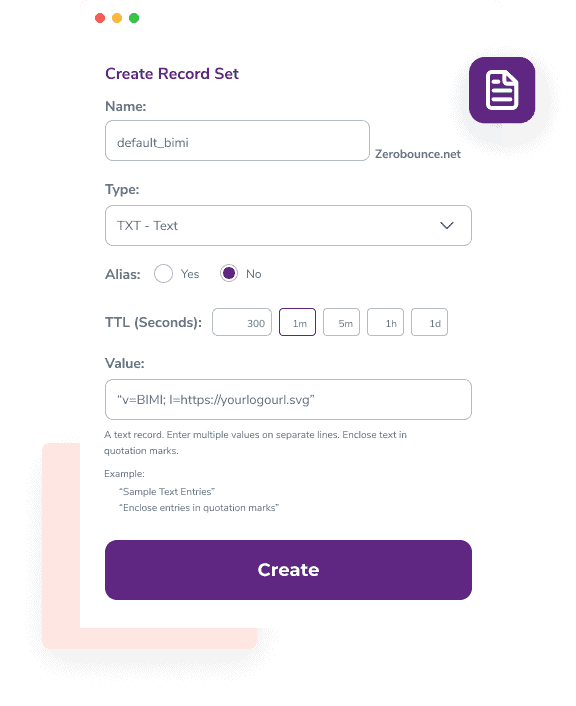
To add BIMI to your email domain, save your generated record as a .TXT file and upload it to your DNS settings with your domain provider.
Since each provider is different, check their specific steps for adding BIMI. The general process looks like this:
Open your DNS settings and click “create a new record” (or similar).
Upload your .TXT file and select the correct record type.
Save and publish your BIMI record.
Note: DNS updates can take up to 24 hours to take effect.
Checking your BIMI DNS set up
After setting up your BIMI record, it is best to test it using a BIMI checker to ensure everything works correctly.
The BIMI checker will confirm:
- ✓ Your BIMI record exists and does not conflict with others.
- ✓ Your logo (SVG file) meets BIMI standards and displays correctly.
- ✓ Your Verified Mark Certificate (VMC) confirms logo ownership.
Run a BIMI check after generating your record to catch any errors and get tips on fixing them.
Test the BIMI checkerIf your BIMI checker shows no issues but your logo still is not appearing, reviewing your other email authentication records in your DNS settings.
Important note
To use BIMI, you must have DMARC email authentication enabled.
Your DMARC policy must be set to ‘quarantine’ or ‘reject’, a ‘none’ policy won’t work with BIMI.
Need help? Use a DMARC Monitor to set up and track your policy,
or check your current settings with a DMARC Checker.
FAQs
A BIMI generator makes it easy to create a BIMI record. Just enter your domain and upload your logo to generate one. Adding a Verified Mark Certificate (VMC) is also recommended.
To create a BIMI record, you need your email domain and a logo in SVG format. Some providers, like Gmail, also require a Verified Mark Certificate (VMC). While not always necessary, having a VMC helps ensure your logo appears across different email services.
For the best BIMI setup, make sure your logo follows these guidelines.
- Square shape (1:1 ratio)
- At least 96*96 pixels (exact dimensions required)
- File size: 32 KB or smaller
- Solid background (recommended)
- No external links or scripts
- Must include a title tag
- Format: SVG tiny PS
To make things easier, use a BIMI conversion tool to adjust your image to the correct format.
BIMI lets email marketers control how their brand appears in inboxes. When your BIMI record is verified, your logo shows up next to your emails. This helps with:
- Stronger email security through authentication
- Building trust with a recognizable logo
- Increasing brand identity in emails
- Improving brand visibility across inboxes
Follow these key steps for the best BIMI setup:
- Use an SVG logo with the right size and dimensions.
- Make sure the image is square and has a solid background.
- Your logo should represent your brand.
- Name the logo file appropriately to match your company.
- Your domain must be authenticated with DMARC.
- Set your DMARC policy to ‘quarantine’ or ‘reject’ (avoid ‘none’).
- Get a Verified Mark Certificate (VMC) to confirm trademark ownership.
You can create an SVG file using any design tool that supports vector graphics, like Adobe Illustrator, Photoshop, or even Canva (which has a free version). To meet BIMI standards, it is best to use one of the BIMI group’s recommended tools for conversion.
If you already have an image, you can also turn it into an SVG using a free online converter.