Why use email authentication with DMARC?
DMARC records are an important tool to track emails from your domain. It helps to prevent fraud and malware attempts using your company name.
What do you mean by DMARC?
DMARC stands for (Domain-based messaging, Authentication, and Conformance) is a security tool that helps protect your company’s email domain from spam, fraud and fake emails.
But DMARC does not work alone. It works best when with two other email security checks:
- SPF (Sender Policy Framework): this tells the world which domains are allowed to send emails using your domain name.
- DKIM (DomainKeys Identified Mail): this adds a digital signature to your emails. Your domain’s DNS holds the public key, and your email provider uses a private key. Both need to match for the email to pass.
DMARC looks at the results from SPF and DKIM. If either one fails, DMARC tells email providers what to do next, like send the email to spam or block it, based on the rules you set in your DMARC record.


What DMARC policies can you choose from?
- Note - This lets emails through, even if the sender is not recognized. It is mainly used for monitoring.
- Quarantine - Emails from unknown senders are sent to the spam folder. They may also be identified as suspicious.
- Reject - Emails from unapproved sources are blocked completely.
If you are just getting started with DMARC, it is a good idea to start with the none policy. This allows you to see where emails are coming from in your company without blocking anything.
Once you understand your email traffic better, you can switch to quarantine or reject to protect your domain from spoofing, phishing, or other threats.
Why use a free DMARC checker online?
Setting up DMARC is important for keeping your emails safe, but if it is not done right, it can cause problems with your email delivery.
A free DMARC checker helps you spot mistakes quickly by checking things like:
- If your DMARC record is set up correctly
- If the format (syntax) is correct
- If your domain is using outside services properly
- What policy you’re using (none, quarantine, or reject)
- If the policy is active
- Whether you accidentally have more than one DMARC record

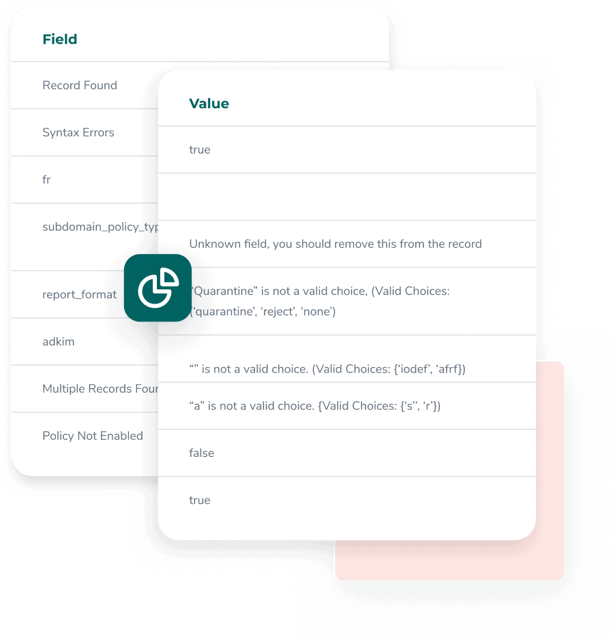
Analyzing Your DMARC Checker Results
When you run a DMARC check, you’ll see different fields in the results. Each one tells you something specific about your DMARC setup. If something’s missing or incorrect, the checker will flag it.
Here’s what the results mean:
- Record Found - This tells you if your domain has a DMARC record set up. You’ll see "true" if it exists, and "false" if it doesn’t.
- Syntax Errors - If there are mistakes in the DMARC setup (like incorrect tags or format), the errors will be listed here, separated by semicolons.
- Multiple Records Found - If you have more than one DMARC record (which you shouldn’t), this will say "true." If there’s only one, it’ll say "false."
- Policy Not Enabled - Even if you’ve chosen a DMARC policy (none, quarantine, or reject), it needs to be properly activated. This field shows whether the policy is actually turned on.
Common Problems Found by DMARC Policy Checkers
Whenever you add a DMARC record to your domain, it’s a smart idea to run it through a DMARC checker first. These tools help you spot problems before they affect your email delivery.
Here are some of the most common issues they detect:
- Formatting mistakes – Syntax errors happen often, especially when writing records manually. Even small details outside the accepted format can cause errors. Using a free DMARC generator can help you avoid this by creating the record in the right format automatically.
- Wrong policy names – DMARC only accepts three policy options: none, quarantine, and reject. They also need to be written in lowercase. If you type something like "block" or "Accept," it will show up as an error.
- Going too strict too soon – One common mistake is setting your policy to "reject" right away. This can lead to emails from your own team getting blocked. It’s better to start with "none" so you can monitor how emails are being sent and make adjustments if needed. Once you understand who’s sending what, you can tighten your policy
Quick tip: Many issues that seem like DMARC problems are actually caused by SPF or DKIM records. If your DMARC record looks fine but emails still aren’t working properly, it’s a good idea to check those other settings too.

Improved DMARC Checker insights
Setting up a DMARC record and checking it for errors is a great start, but it’s just the beginning when it comes to improving your email security.
To get the most out of DMARC, it’s a good idea to use a DMARC monitoring tool. It helps you catch more advanced threats and gives you automatic reports on every email sent from your domain.
Here’s how it helps:
1. Enter the domain to monitor with the DMARC Monitor
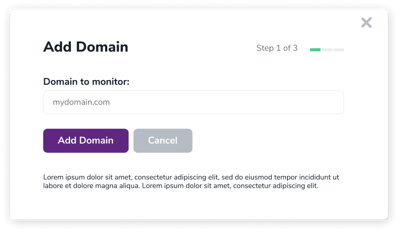
2. Create your DMARC record easily
Use the simple three-step tool to generate your DMARC record. By default, it sets the policy to ‘none’ so you can start monitoring safely. You can also adjust the settings later if you want more control.
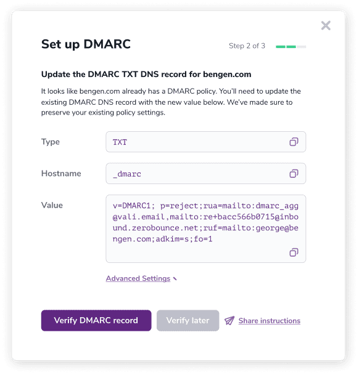
3. Simply select 'Verify DMARC Record'
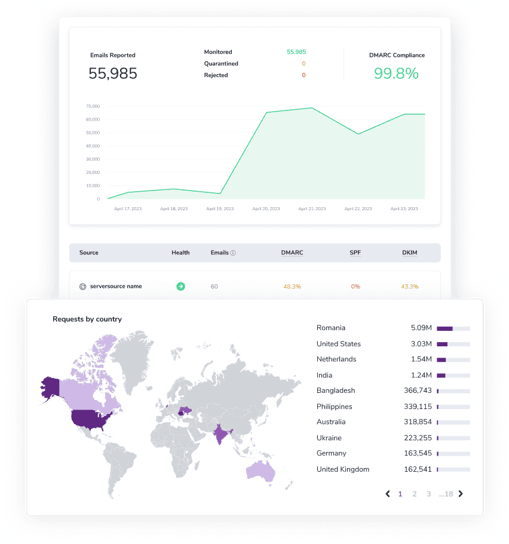
After FareOf confirms your DMARC record, the DMARC Monitor will start showing daily updates, such as:
- The total number of emails sent and reported
- Emails that were monitored, sent to spam, or blocked (based on your settings)
- Your overall DMARC compliance rate
In addition, the DMARC Monitor provides important information, including:
- Confirmation of SPF and DKIM records
- SPF and DKIM alignment rates
- A list of IP addresses sending emails and the number of emails sent from each Geolocation details
- Alerts for any suspicious email activity
FAQs
A DMARC checker is a free tool that helps you find and check the DMARC record for a domain. If a record exists, it looks for things like:
- Whether the DMARC record is present
- Any syntax mistakes
- The policy type being used
- If the policy is active
- The report format
- If there’s more than one DMARC record set up
Yes, you can use the DMARC validation tool at any moment to examine the DMARC entries for any domain.
The DMARC record checker looks for syntax problems and forbidden values in the required fields. It will display the found (or missing) value in the record, allowing you to easily identify and correct mistakes.
When creating a new DMARC record, double-check it before adding it to your DNS. Also, if you're having problems with email deliverability, utilize a DMARC checker in conjunction with an SPF and DKIM checker to identify any possible misconfigurations with your email authentication.
The free DMARC checker simply looks at the DMARC record that was found. If you wish to monitor SPF, DKIM, and DMARC all at once, you should use a DMARC Monitor.
DMARC improves your email security by giving email service providers clear information on how to handle suspicious or untrustworthy communications from your domain. DMARC can assist in preventing sophisticated email attacks and spoofing. This will secure not just your staff and customers, but also your email sender reputation by removing possibilities for spammers and other dangers to abuse your company's email domain.
Improve your company's email security using FareOf
Sign up your account