Email server tester tool
Having trouble with email delivery? Our email server tester checks your server’s health with 100+ tests, covering headers, DNS, and SMTP settings.
Test it today - receive 1 free email server health check every month
Check my email tester
Resolve email server troubles
Struggling with undelivered emails? Our Email Server Test helps you find and fix problems that affect your email campaigns. Even if your contact list is clean, a poor server setup could be causing issues.
Check and improve your SMTP settings, analyze email headers for hidden problems and verify email authentication.
Header information
- ✔ Return Path & Message ID
- ✔ DKIM & DomainKey Signatures
- ✔ X-AntiAbuse Tracking
- ✔ And more
RFC Testing
- ✔ MIME (RFC 2045)
- ✔ Sender ID (RFC 4406)
- ✔ SPF & DKIM Compliance (RFC 4408, 4871)
- ✔ Email Format Check (RFC 5322)
- ✔ and more
Check DNS records
- ✔ MX & A Records
- ✔ rDNS & PTR Records
- ✔ SSPF Record Validation
- ✔ Last Sending Domain Check
- ✔ And more
Email security and port checks
- ✔ Supported Protocols & Extensions
- ✔ Server Connection Status
- ✔ SMTP Banner & rDNS Matching
- ✔ SSL/TLS Security (Protocol & Cipher)
DMARC analysis
- ✔ DMARC Reports (RUA & RUF)
- ✔ Alignment Tests for DKIM, SPF & DMARC
- ✔ DomainKeys & Signing Policy Checks
Additional tests
- ✔ SPF alignment
- ✔ DKIM alignment
- ✔ DMARC check
- ✔ Author Domain Signing Policy
- ✔ DomainKeys check
- ✔ and more
Get a complete email server test now
Advantages of using the email server tester
Fix email sending issues
Cleaning your email list and still facing delivery problems? Your email server setup might be the reason.
Our email server tester makes it easy to check your server’s health. We run SMTP relay tests, compliance checks, and many other diagnostics to find issues. We help you to identify what is blocking your emails, run in-depth server health checks, and actionable fixes to improve deliverability.

Raise your email server performance
If your business relies on sending and receiving a high volume of emails, your server needs to run smoothly.
Our email server test helps you find and fix issues affecting email processing and delivery. Get expert level insights to improve performance, speed, and reliability without any hassle.

Keep your emails out of spam
Your emails might be getting delivered but are they landing in spam? Poor server setup, weak authentication, or security issues can make email providers flag your messages as untrustworthy.
Our email server test checks DMARC settings, authentication alignment, and security configurations to keep your emails safe and trusted.

Make sure your emails reach the inbox
Bounced or undelivered emails can hurt your sender reputation, making it harder for future emails to get through. If your email server isn’t set up correctly, you’ll face more delivery issues over time.
Our email server tester helps you check your setup regularly, so you can spot and fix problems before they affect your business. We help you to improve email deliverability, protect your sender’s reputation, and ensure proper email authentication.

How to run email server tests in 3 steps
Verify your email server
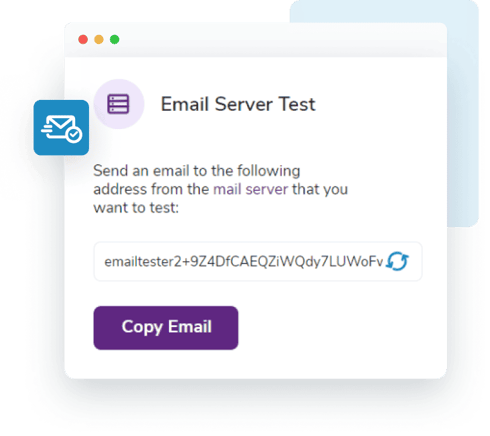
We will give you a test email address. Send an email from your mail server, and we will start checking its health right away.
Check Your Email Server Health
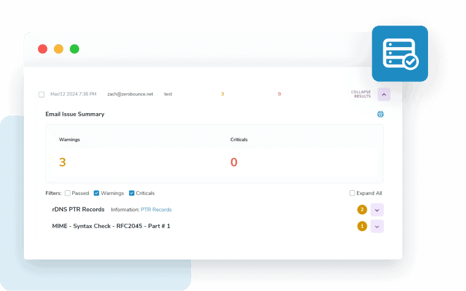
Your results will be ready in minutes that show you any issues affecting your email delivery.
Find and Fix Email Issues
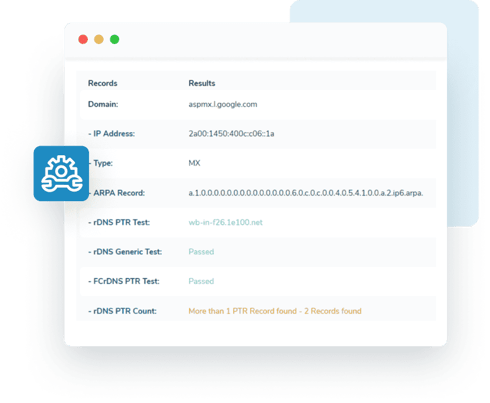
Your email server report will highlight any problems and give you clear steps to improve deliverability.
Stay one step ahead of email problems
Receive a free email server test monthly.
Major email server problems
Why are not my emails sending?
Your email setup might have issues with SMTP, DNS, MX records, or ports.
Don’t worry. Just send a test email using our email server test, and we will pinpoint the issue and give you the fix.
Why are not my emails reaching inboxes?
Your system says emails are sent, but they’re not arriving. If it is just one or two cases, storage might be the issue. If it is broad, the problem could be authentication records, DNS settings, or email ports.
An email server test can help pinpoint the cause and get your emails back on track.
Why are my emails being blocked or restricted?
If your emails are getting blocked or restricted, receiving servers might see them as unsafe.
Are your SPF, DKIM, and DMARC settings correctly configured? A small mistake can cause major delivery issues and even blocking emails from your own domain.
Our email server tester runs a full DMARC analysis to check for errors, security issues, and email authentication problems that could be causing blocks.
A poor sender reputation can also get your emails blocked or restricted. Keep your email list clean by removing inactive subscribers.
Email server security problems
Email servers block messages without proper authentication because of rising security threats like spoofing and phishing. If your settings aren’t correct, hackers can pretend to be your business and send fake emails. This leads to serious risks.
Our email server test helps you check for security issues, fix authentication errors, and make sure only trusted senders use your domain. A properly set up email server not only protects your business but also improves email delivery. Run a quick test today to keep your emails safe and trusted.
Resolve email delivery problems instantly
Receive a free email server test monthly.
More ways for better email delivery
Running an email server test is a great way to improve performance and increase inbox placement. But even if your test looks good, there are a few other things to check.
Keep your email list clean –Even a perfectly configured email server can’t deliver messages to invalid addresses. Use an email verifier to remove outdated or risky contacts.
Check for blacklists –If your emails still aren’t getting through, your domain might be on a blacklist. A blacklist monitor can scan 200+ lists and notify you if your domain is flagged.
Secure Your email domain –Email security is no longer optional. SPF, DKIM, and DMARC records help protect your emails, and a DMARC monitor makes it easy to set up and track suspicious activity.
Improve your email content – Sometimes, emails are blocked because of the words, phrases, or images they contain. An inbox placement tester can check your content against different email providers to ensure your messages do not land in spam.
Check Your Email Server for Free
Make sure your emails are landing where they should. Our 3 steps email server test helps you to identify and solve delivery issues with ease.
Sign up for a free FareOF account to access powerful tools and monthly perks.
100 credits
For email validation, activity data and email scoring
10 Email
Finder searches
1 Inbox
Placement
1 Email
Server Test
1 blacklist
Monitor
FAQs
You can easily check your email server for free using an email server tester. This tool scans your domain for over 100 potential issues, identifying both minor warnings and critical errors. It also provides a detailed report with step-by-step fixes, helping you improve your email setup and ensure smooth delivery.
To keep your email server running smoothly and securely, follow these best practices:
- Make sure your MX records point to the right mail server.
- Keep your domain's Whois record updated for easy identification.
- Set up a return path to handle bounced or undelivered emails.
- Use SPF to define a list of approved senders and IPs.
- Protect your emails with DomainKeys encryption.
- Implement a DMARC policy to monitor email activity.
- Set sending limits to prevent spam and block spoofing attempts.
- Restrict server access to only trusted users.
- Use strong passwords and enable two-factor authentication.
- Regularly test your email server to catch any configuration issues.
Email servers often run into problems like incorrect SMTP settings, which help send messages between servers. If these settings are wrong, emails might not get delivered or could disappear. Other common issues include failed authentication, wrong port numbers, and misconfigured domain records like DNS, MX, SPF, DKIM, or DMARC.
Fix email issues in minutes and run a free email server test to spot and solve problems fast
Begin with a free trialReceive one free email server test each month and many more