What do you mean by a DKIM record?
DKIM (DomainKeys Identified Mail) is a way to protect your domain and make your emails more trustworthy. It works by attaching a unique signature to your outgoing emails.
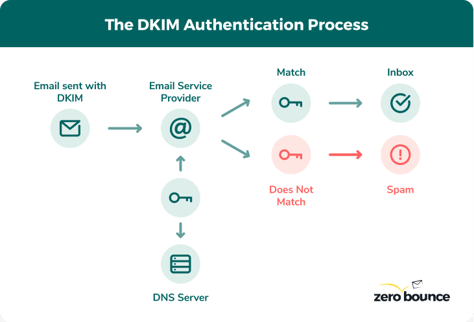
Email servers use this signature to check if the email is legit. If it passes the check, it’s delivered normally. If it fails, it could be blocked or marked as spam.
Using a DKIM record helps keep your domain safe from hackers and fake senders. You can generate one in seconds with the free DKIM tool above.

DKIM vs. SPF – Do You Need Both?
Yes, you should use both DKIM and SPF to protect your email domain. They work in different ways but together give your emails better security.
SPF (Sender Policy Framework) is like a list of approved IP addresses that can send emails from your domain. When an email is sent, the receiving server checks if the sender’s IP is on that list. If it is, the email passes the SPF check.
DKIM works differently. It adds a digital signature to each email. The receiving server looks for that signature and verifies it. If it matches, the email passes the DKIM check and is more likely to land in the inbox.
Even if SPF fails, DKIM can still help the email go through if everything else checks out. Using both SPF and DKIM gives your domain stronger protection and helps your emails reach your audience safely.
Add a Layer of Protection to Your Emails
DKIM and DMARC for Stronger Email Protection
DKIM helps protect your domain by adding a special signature to each email you send. This signature proves the message really came from you and helps block fake senders from using your domain.
DMARC works with DKIM and lets you set rules for what to do when a message fails the DKIM check like whether to block it, send it to spam, or just report it. It gives you more control over how suspicious emails are handled.
By using DKIM, SPF, and DMARC together, you can greatly improve your email security and protect your domain from spoofing.


How to Use the Free DKIM Generator
1. Enter Your Domain Name
Start by entering the domain you want to protect—the part after the "@" in your email address (e.g., in user@yourdomain.com, the domain is yourdomain.com). Even if you don’t send emails from a domain, it’s still a good idea to secure it with a DKIM record to prevent spammers from using it.
2. Add a DKIM Selector
A selector is a short, custom name that helps identify the right DKIM key for your emails. Each time you create a DKIM record, choose a unique selector so your server knows which key to use when signing messages.
3. Choose a Key Size and Add Records
Pick the level of encryption you want, larger keys mean stronger security, but make sure your domain host supports the size. The generator will create your public and private keys. Add these to your email service and update your DNS settings by adding the CNAME records provided.
Protect your emails with DKIM now
What to Do After Creating Your DKIM Record
To get even better email protection, we recommend using our SPF and DMARC generators too. These records work together to help stop spam, spoofing, and other email threats. They also tell email providers what to do if a message doesn’t pass your security checks.
Each tool comes with an easy step-by-step guide, so you can set everything up quickly and confidently, no guesswork needed.

Other helpful tools:
FAQs
A DKIM generator enables users to generate unique public and private DKIM records for email encryption. You only need to include your email domain and a DKIM selector. After you choose an encryption level, the DKIM generator generates DKIM records right away.
A DKIM signature is a unique encryption key that protects your domain from email spoofing attempts. Consider your DKIM key to be your brand's signature, which a bad actor would be extremely unlikely to imitate.
Strong email security starts with DKIM. It adds a unique, encrypted signature to your emails, making it much harder for attackers to fake messages from your domain.
Even if you’re using SPF, it’s not always enough. Skilled spammers can sometimes slip through, especially if their IP looks trustworthy. Plus, SPF doesn’t work well with forwarded emails, while DKIM usually still holds up.
That said, no system is perfect. Big changes to an email’s content or headers can sometimes break DKIM too. But overall, adding a DKIM record gives you a strong layer of protection against most spoofing and phishing attempts.
Yes, DKIM offers stronger protection because it uses encryption. This means your emails include a digital signature that only authorized servers can read and verify.
SPF, on the other hand, is just a list of approved IP addresses and doesn’t use encryption. While it helps block some unwanted senders, it’s easier for attackers to get around on its own.
Still, DKIM by itself isn’t enough. The best way to protect your domain is to use both DKIM and SPF together. That way, emails must pass two layers of security before they’re allowed through.
Secure Your Business Email with FareOf
Join Free Today