What do you mean by DMARC generator?
DMARC is an email security protocol designed to protect your brand’s domain from spoofing attacks. It works by aligning two key authentication methods - SPF (Sender Policy Framework) and DKIM (DomainKeys Identified Mail), and guiding email providers on how to handle messages that fail these checks.
To understand how DMARC works, let’s break down its two security partners:
- SPF verifies that an email is sent from an approved IP address or hostname. If the sender is on the authorized list, the email passes this check.
- DKIM adds a unique encrypted signature to every authorized email. The email provider compares this signature to a stored key and determines whether the message is valid.
On their own, SPF and DKIM operate separately. But with a DMARC policy in place, they work together to give email providers clear instructions on what to do if an email fails authentication, helping to protect both your domain and recipients from fraudulent messages.

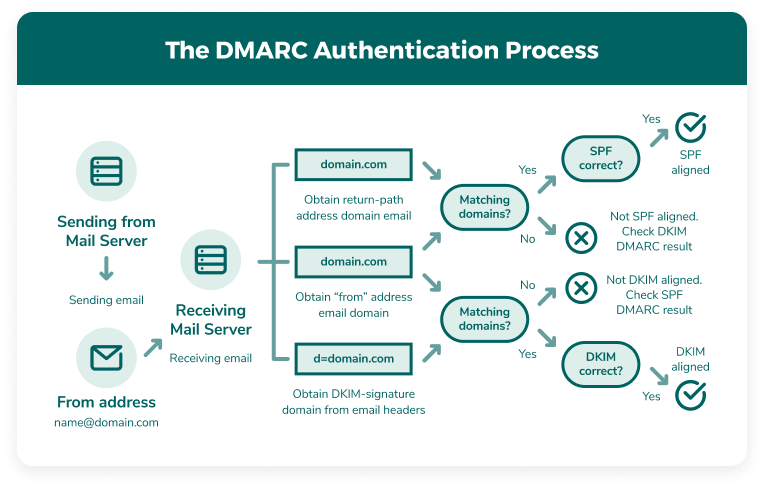 Example -
Let’s say sender A fails the SPF check. In response, the ISP runs a DKIM check to verify the email’s authenticity. If sender A fails both checks, the ISP then refers to your DMARC policy to determine what happens next.
Your DMARC policy defines how unauthenticated emails should be handled with three possible options:
- None: the ISP takes no direct action, meaning the email may still reach the recipient’s inbox. This setting is useful for monitoring, but it leaves your domain vulnerable to spoofing.
- Quarantine: emails that do not pass authentication are sent to a quarantine area or if unavailable, directed to the recipient’s spam folder.
- Reject: any email that fails authentication is blocked entirely, preventing it from reaching the recipient.
By implementing DMARC, you create a stronger layer of security for your email domain. It ensures your authentication protocols work together and gives you better control over your email traffic. Plus, with regular reports, you can monitor suspicious activity and make informed decisions about which senders to allow, quarantine, or bock.
Advantages of using DMARC records
If you are serious about protecting your email reputation, DMARC is important. By setting up a DMARC record, you gain greater control over your email security and ensure that only legitimate messages are delivered under your domain name.
Just use our free DMARC generator to create your record, upload it, and start enjoying the advantages of stronger email authentication and improved deliverability.
Stronger email security
SPF, DKIM, and DMARC work together as the foundation of email security. By implementing DMARC, you gain better control over who can send emails on behalf of your domain. It aligns your authentication protocols and generates ongoing reports, helping you detect and prevent suspicious activity before it becomes a problem.
Better email deliverability®
Not every email authentication failure is caused by a malicious sender. Sometimes, misconfigurations in your email setup can prevent legitimate messages from being delivered. DMARC provides detailed reports that help you diagnose these issues, so you can fix authentication errors and ensure your emails reach their intended recipients.
Protect your brand’s reputation
Your email reputation plays an important role in how your messages are received. If cybercriminals spoof your domain to send phishing emails, it can damage your credibility and even get your domain blacklisted. Even genuine emails can sometimes end up in spam due to security misconfigurations. DMARC helps prevent phishing attacks, reduces spam classification, and ensures that your authorized senders can reliably use your domain.
How to use the DMARC Generator
Setting up a DMARC record is simple with our DMARC generator. Follow these steps to create a properly configured record for your domain:
Basic Setup
1. Enter your email domain - start by entering your domain name. If it's valid, additional fields will become available.
2. Choose your DMARC policy - select the policy that best fits your needs. You can refer to the previous section for details on the three DMARC policy options.
3. Generate and copy the record - once you have filled in the required fields, the generator will create your DMARC record. Copy the provided code and add it to your domain’s TXT file.
Optional DMARC Settings
To further refine your DMARC record, you can configure these optional settings:
1. Subdomain policy – if you have a subdomain, set a policy for how its emails should be handled. If you are unsure, select "None."
2. Aggregate Report Email (RUA) – enter the email address where you would like to receive summary reports on DKIM, SPF, and DMARC authentication results.
3. Forensic Report Email (RUF) – these reports give detailed insights into failed authentication checks. If a valid email fails, you can use this data to troubleshoot the issue. Enter the email address where you would like to receive forensic reports.
4. Report Format – choose how you would like to receive reports:
- AFRF (Authentication Failure Reporting Format): best for general email authentication reports.
- IODEF (Incident Object Description Exchange Format): it is ideal for cybersecurity teams managing security incidents.
5. Reporting Frequency – set how often reports should be sent. The interval is measured in seconds (e.g., 86,400 seconds equals one day).
6. Message Sampling Percentage – choose the percentage of emails ISPs should analyze. For maximum visibility, we recommend reviewing 100% of your emails.
7. DKIM Alignment – determines how strictly emails must match your DKIM records. "Relaxed" is the recommended setting for most users.
8. SPF Alignment – similar to DKIM, this setting controls how closely emails must align with SPF records. "Relaxed" is usually the best option.
As you update these settings, the DMARC generator will automatically create three DMARC record options at the bottom of the page. Select the one that best fits your security needs, and implement it to increase your email protection.
Three kinds of accessible DMARC records

DMARC Recorder
This is a common line of code that generates a TXT record in your DNS settings. Log into your DNS, click create a new record, and enter this code as the record value. Also, put “_dmarc” at the end of your selected record name.

Using DMARC records with BIND
BIND (Berkeley Internet Name Domain) is a widely used DNS management software, trusted by administrators for its flexibility and reliability. It works seamlessly on both Windows and Linux, making it a popular choice for managing DNS records. With regular updates and strong community support, BIND provides an efficient way to implement DMARC records and enhance email security.

Using DMARC records with TinyDNS
TinyDNS, also known as djbdns, is a lightweight DNS server that some administrators prefer for its security-focused design. While it offers an alternative to BIND, it lacks extensive documentation and widespread platform support. As a result, it may not be the best choice for beginners who require detailed guidance during setup.
FAQs
Yes, implementing a DMARC policy is an essential step in protecting against phishing attacks. It works by combining two key email authentication protocols - SPF (Sender Policy Framework) and DKIM (DomainKeys Identified Mail), to verify the legitimacy of emails sent from your domain.
If an email fails either the SPF or DKIM check, DMARC acts as an extra layer of security by reviewing the results and enforcing the policy you’ve set. This helps prevent cybercriminals from impersonating your domain and improves email security.
As phishing attacks become more advanced, businesses need the visibility and control that DMARC provides. With DMARC, you can instruct ISPs on how to handle unauthorized senders, reducing the risk of fraudulent emails reaching inboxes.
Without DMARC, Internet Service Providers (ISPs) do not verify whether SPF and DKIM records are properly aligned. Instead of following a structured set of rules, ISPs make independent decisions about handling your emails, which can lead to rejections and email deliverability issues. More importantly, without DMARC in place, your domain remains vulnerable to phishing attacks and spoofing attempts.
DMARC ensures that SPF and DKIM authentication checks work together. It also allows you to define a clear policy for ISPs to follow whether to allow the email (none), send it to spam (quarantine), or reject it entirely. By implementing DMARC, you gain better control over your email security and reduce the risk of malicious activity targeting your domain.
SPF is a single part of your email security. SPF and DMARC records serve different purposes and help with email authentication in the following ways:
SPF is a list of valid hostnames and IP addresses that can be sent from your email domain. The receiving ISP checks your IP addresses that can be sent from youremail domain. The receiving ISP check your IP address against the SPF record. If you pass the check, the email will be delivered to your inbox.
When the SPF check fails, the ISP searches for instructions in your DMARC record. DMARC instructs the ISP on what to do with the email: allow, deny, or quarantine. This gives you more control over your security and allows you to reliably identify trends in possible threats that bounce invalid emails.
No, DMARC is designed to authenticate emails and prevent phishing attacks by blocking unauthorized use of your domain.
However, while DMARC strengthens email security, it is not an absolute safeguard. Sophisticated attackers can still attempt to deceive recipients by using domain names or display names that closely resemble yours. While DMARC protects your exact domain, it does not prevent spoofing of similar-looking addresses.
While it is technically possible, SPF, DKIM, and DMARC are essential layers of email security.
These authentication protocols help prevent cybercriminals from using your exact domain or IP address to send fraudulent emails. However, attackers are constantly finding new ways to bypass security measures and deceive recipients.
One of the biggest risks comes from outdated or improperly configured DMARC records. If businesses fail to update their DMARC settings regularly, they leave gaps that could be exploited.
To stay ahead, it's crucial to actively manage your email security. Regularly update your list of approved senders, remove access for former employees or partners, and review DMARC reports for any signs of suspicious activity. By closely monitoring and refining your security settings, you can strengthen your defenses and reduce the chances of unauthorized emails slipping through.
A DMARC vulnerability refers to weaknesses in DMARC implementation due to human error or technical limitations. The effectiveness of email authentication depends on proper setup. Mistakes in record configuration or policy settings can create security gaps that cybercriminals can exploit. To reduce the risk of errors, using a DMARC generation tool can help ensure accuracy in your records.
Another vulnerability arises when a DMARC policy is not properly enforced. Some businesses start with a 'none' policy to monitor email activity, but leaving it that way indefinitely allows spoofers to continue sending unauthorized emails using your domain. Moving to a stricter policy, such as 'quarantine' or 'reject,' helps block these threats.
However, even with SPF, DKIM, and DMARC in place, some risks remain. These protections do not prevent:
- Lookalike domains designed to resemble yours (also known as cousin domains)
- Emails that are forwarded by recipients
- Alterations to email headers or body content
- Malicious attachments
- Other phishing tactics unrelated to domain spoofing
Because of these limitations, businesses should take a proactive approach by continuously monitoring email security and considering additional protections. A dedicated security team or advanced threat detection tools can help identify and prevent evolving threats before they cause harm.