What is Email Bounce Rate?
Email bounce rate is the percentage of emails that fail to reach the recipient’s inbox when sending a campaign or newsletter. You can calculate it using this formula:
(Undelivered emails ÷ Total emails sent) = Bounce rate
Emails can bounce for different reasons, which is why they are usually divided into two categories.
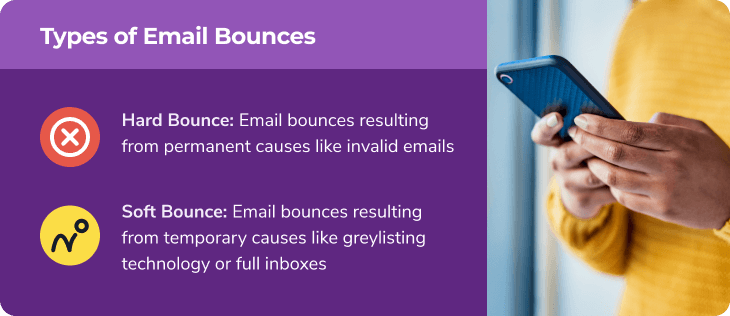
A hard bounce happens when an email can’t be delivered permanently, usually due to an invalid or non-existent email address. A soft bounce is a temporary issue, like a full inbox or greylisting technology blocking the message.
- Hard bounces are the biggest concern because they can hurt your email deliverability and signal problems with your email list. A high hard bounce rate means it's time to clean up your list.
- Soft bounces aren't ideal, but they can often be fixed once the temporary issue is resolved. Your email service provider (ESP) can track both types and adjust your sender reputation accordingly.
What do you mean by acceptable email bounce rate?
A high email bounce rate can hurt your ability to reach inboxes. Hard bounces, in particular, can damage your sender reputation and lower your email deliverability.
To stay in good standing with internet service providers (ISPs), keep your bounce rate below 2%. This limit helps separate legitimate senders from spammers.
Email providers (ESPs) monitor bounce rates, and if yours is too high, you may receive a warning or even face account restrictions.
How Bounce Rates Vary by Industry
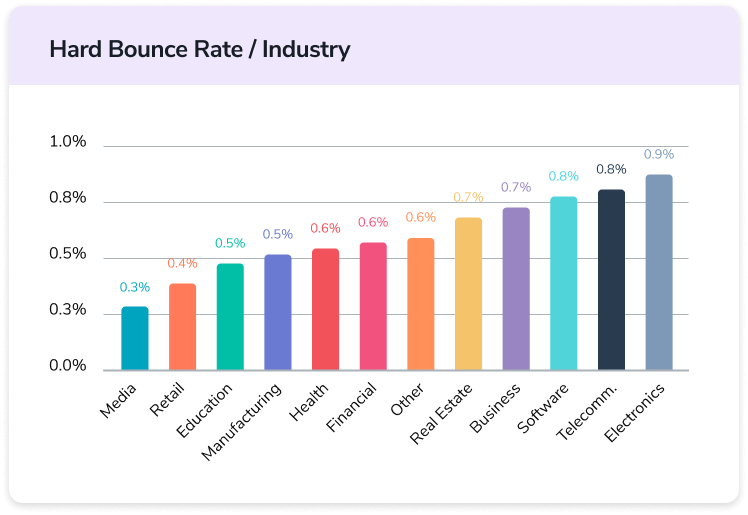
On average, businesses keep their email bounce rates under 1%. A HubSpot study found that the industry average is around 0.63%, showing how important it is to keep your bounce rate low for better deliverability. HubSpot
How to Read Your Bounce Rate Results
Once you enter your numbers, the email bounce rate calculator will show your status:
- 2% or less – Great! Your bounce rate is in the safe zone.
- 2.1% - 5% – Caution! It’s a bit high; cleaning your list may help.
- Above 5% – Warning! Your emails might not reach inboxes.
If your bounce rate is over 2%, try FareOf’s email validation tool to remove bad addresses and improve deliverability. Even if you’re under 2%, regular validation keeps your email list in top shape
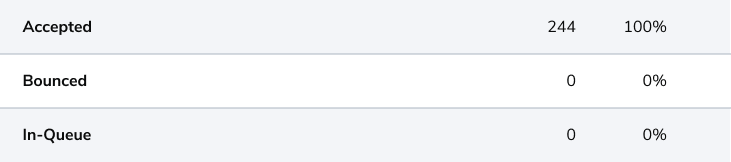
Invalid Emails Can Raise Your Bounce Rate
Having too many invalid email addresses on your list is one of the biggest reasons for a high bounce rate. If an email doesn’t exist, your message won’t be delivered, causing a hard bounce.
Here’s how invalid emails end up on your list:
- Typos & Mistakes – People accidentally enter the wrong email when signing up. Even small errors, like missing a letter, can make an address useless.
- Purchased Lists – If you buy an email list, there’s no guarantee the addresses are real or active. Always verify your contacts.
- Disposable Emails – Some people use temporary emails that expire in minutes, making them useless for future campaigns.
- Old or Inactive Emails – People change jobs or update their emails, leaving old addresses unused.
Spam Filters Might Be Delaying Your Emails
Ever sent an email that didn’t go through right away? Anti-spam tools, like greylisting, might be the reason. They temporarily block emails from new senders to filter out spam.
The good news? These bounces aren’t permanent! Most email servers will retry sending after a short wait, usually around 15 minutes. If this keeps happening, you can set your email system to try resending after a delay and ask the recipient’s provider to whitelist your domain.
Full Inboxes Can Cause Email Bounces
When a recipient's inbox is full, it can't accept new emails, leading to a soft bounce. This means your email wasn't delivered, but you can try sending it again later. If the problem continues and there's no engagement from that address, it might be best to remove it from your list, as the account could be inactive.
Why High Bounce Rates Are Bad for Your Emails
ISPs see high bounce rates as a sign of potential spam. If your bounce rate stays above 2%, they might start doubting your emails, even if you're genuine.
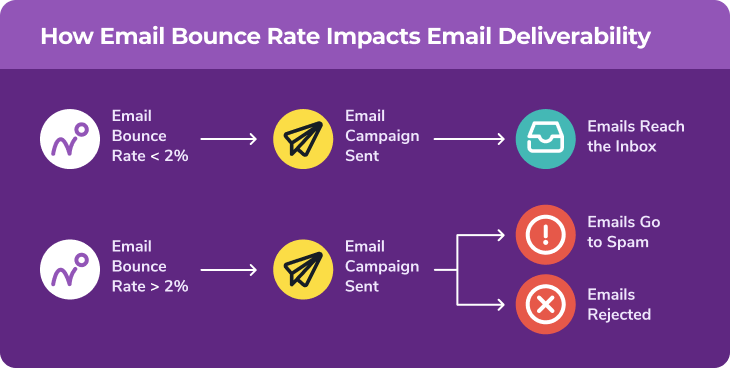
When emails end up in the spam folder instead of the inbox, they may be “delivered,” but they’re far less likely to be seen, opened, or clicked. Messages marked as spam also appear less trustworthy, making it harder to engage your audience.
In more severe cases, strict spam filters can block emails from your domain entirely, preventing them from reaching valid contacts until you improve your sender reputation.
How to Use Bounce Rate to Improve Email Performance
A high bounce rate can harm your email deliverability, especially if too many messages are marked as “hard bounces.”
If your bounce rate consistently exceeds 2%, take it as a sign to review your email list, remove outdated addresses, and refine your sending strategy to maintain a strong sender reputation.
Why a Regular Email Schedule Matters
Bounces happen, but too many can spell trouble. The key? Send emails consistently. A predictable schedule helps keep your bounce rate low and ensures your emails actually reach people.
Each time you send a campaign, review your metrics. If emails bounce because addresses are no longer valid, clean them from your list.

FareOf gives free users one email server test per month to help prevent email bounces.
Email authentication helps email providers verify that your messages are actually coming from you not from a spammer.
There are three key authentication methods:
- SPF (Sender Policy Framework) – Confirms which mail servers can send emails on your behalf.
- DKIM (DomainKeys Identified Mail) – Adds a digital signature to prove your emails haven’t been tampered with.
- Disposable Emails – Some people use temporary emails that expire in minutes, making them useless for future campaigns.
- DMARC (Domain-Based Message Authentication, Reporting, and Conformance) – Helps prevent spoofing and phishing attacks.
Setting these up proves you’re a trusted sender and reduces the chances of your emails bouncing or getting flagged as spam.
Prevent Bounces with Double Opt-Ins
Want to avoid fake signups and email bounces? Use a double opt-in system. Here’s how it works:
- A user signs up for your emails
- They get a confirmation email and must click a link to verify.
- Once confirmed, you know the email is valid, reducing bounce rates.
Without this step, people can enter fake emails, and you won’t know until messages start bouncing. Double opt-ins help keep your email list clean and trustworthy.
Reduce Email Bounces with Email Validation
Invalid email addresses are the main reason emails bounce. An email validation service can quickly scan your list, remove bad addresses, and improve deliverability.
Aside from occasional soft bounces, regular validation helps keep your bounce rate near zero, makes sure your emails reach real inboxes.

Keep Your Email List Clean with FareOf
FareOf makes email validation simple. You can upload an entire email list for bulk verification or check addresses individually. Here’s how it works:
- Export your email list from your current email provider.
- Upload it to FareOf for cleaning.
- Download the cleaned list and import it back into your system.
For ongoing accuracy, FareOf’s real-time API ensures invalid addresses never make it onto your list. It’s compatible with:
- PHP
- iOS
- Scala
- Rust
To maintain a high-quality email list, it’s best to run a full validation every quarter.
Test our free email deliverability calculators
FAQs
An email bounce rate measures how many of your emails fail to reach recipients. It’s calculated as a percentage of undelivered emails compared to the total sent. Use this formula:
Bounced emails ÷ Total emails sent = Bounce rate (%)
A healthy email bounce rate is typically below 1%. Most everyday senders email known contacts, while businesses work to remove outdated or incorrect addresses. That’s why a 2% bounce rate is widely accepted as an industry standard for good email hygiene.
If your email bounce rate is over 2%, it's a sign of trouble. A 20% bounce rate is especially risky. It can hurt your email deliverability and even lead to your account being suspended. To prevent this, identify the causes of your high bounce rate and take action to fix them before they create bigger issues.
A high email bounce rate is often due to poor email list maintenance. One of the biggest issue is sending emails to invalid or outdated addresses. Other factors, like strict spam filters, misconfigured email servers or full inboxes, can also cause emails to bounce. Keeping your email list clean and regularly updated can help reduce these problems.
Decreasing your email bounce rate starts with a few key steps:
- Regularly clean your email list once every three months.
- Use a real-time email verification tool to filter out invalid addresses.
- Authenticate your email domain to improve deliverability.
- Make sure your email server settings are properly configured.
- Implement double opt-ins to confirm valid subscribers.
- Stick to a consistent sending schedule to keep engagement high.
To show your brand logo in marketing emails, set up a BIMI record in your DNS and complete the verification process. You’ll need a valid BIMI record, an approved logo image, and a Verified Mark Certificate (VMC) to prove logo ownership.
A low email bounce rate starts with FareOf. Sign up today!
Try it free todayGet 100 email validation credits instantly