What do you mean by SPF Record?
It is a way to protect your domain from email spoofing. It’s basically a list that tells email services which servers, domains, or IP addresses are allowed to send emails on your behalf. You can even set it to allow a whole range of IPs if needed.
When someone from your domain sends an email, the receiving server checks your SPF record. If the sender’s IP address is listed there, the email is more likely to be trusted and land in the inbox. That said, things like the content of your email still matter and can affect whether it ends up in spam.
If the sender’s IP isn’t listed in your SPF record, the email service will look at your DMARC settings (if you have them) to decide what to do, either send the email to spam or block it completely.
This setup helps protect your domain from being misused by spammers and also ensures your emails are safely delivered to the right people.
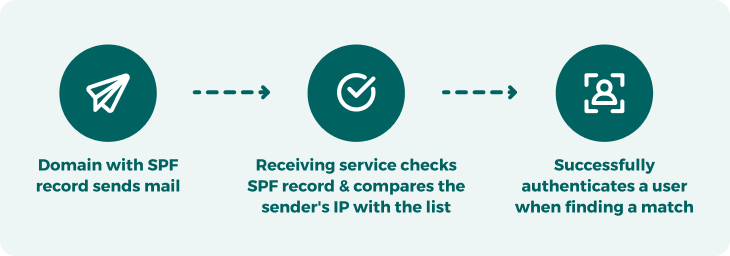
A domain with SPF in place sends out an email - The email service checks the SPF record to see if the sender's IP is allowed - It verifies the sender’s identity if there’s a match
Why your domain needs SPF protection
If you care about your brand’s reputation and want your emails to actually reach people’s inboxes, it’s important to control who can send emails using your domain.
With our SPF generator, you can easily create a list of trusted IP addresses, domains, and hostnames allowed to send emails on your behalf. This helps block scammers from pretending to be you.
Without SPF protection, hackers can spoof your domain, basically sending fake emails that look like they’re from you. These are often used in phishing attacks to steal personal info from your customers or leads.
When that happens, people might report your domain for spam or abuse, even if you did not send those emails. This can hurt your sender reputation, cause your emails to bounce, or even get your domain blacklisted by email providers.
Three types of SPF Records

Standard SPF Record
This is the most commonly used portion. Just copy the code provided and paste it into your domain’s DNS settings as a TXT record. The exact steps may vary depending on your DNS provider, but this format works in most cases.

SPF Record for BIND
If your email server uses BIND (Berkeley Internet Name Domain), a popular free DNS server, you will want to use this version of the SPF record. BIND supports modern features like DNSSEC and IPv6 and is widely supported, with plenty of guides available if you need help managing your records.

SPF Record for TinyDNS
If your system uses TinyDNS (also known as djbdns), use this version. TinyDNS is a lightweight, security-focused DNS server. While it is powerful, it is not very beginner-friendly and does not always work smoothly with other tools. If your server admin prefers TinyDNS, just copy this code into your DNS TXT records.
Using SPF with DMARC and DKIM for stronger email protection
Using our free SPF generator is a great first step in protecting your emails. An SPF record helps verify that only trusted sources can send emails from your domain, which helps keep spammers out.
But to fully protect your email reputation and deliverability, it is even better to pair SPF with DMARC and DKIM, two additional layers of email security.
Here is why that matters:
Every email has two addresses behind the scenes. One is the return path used by the server to check your SPF record. If it matches, the email passes the check and is delivered. But this return path is hidden from the person receiving the email.
That’s where spammers get sneaky. They can fake the return address (to pass the SPF check) while showing a legit-looking “From” address in the message. Sometimes, they’ll even use old or forgotten IP addresses connected to your domain.
This is where DMARC and DKIM come in.
- DKIM adds a digital signature to your emails so the receiving server knows the message really came from your domain and hasn’t been tampered with.
- DMARC gives instructions on what to do if an email fails SPF or DKIM checks like send it to spam or block it completely.
Together, SPF, DKIM, and DMARC build a powerful shield around your domain. They help keep your emails safe and make it harder for anyone to impersonate your brand.
Some email authentication tools
FAQs
If your domain already has an SPF record, you will find it listed in your domain’s DNS settings. It shows up as a TXT record, and it might include things like A-records, MX records, or IP addresses (IPv4 or IPv6). Are you not sure if you have one? You can use a free online tool to check if an SPF record exists for your domain.
Yes, having an SPF record is important. It helps protect your domain from being used by spammers or attackers. Without it, anyone could pretend to send emails from your domain and if those emails are spammy or harmful, people might report you.
Too many reports can hurt your sender reputation and even get your domain blacklisted, which means your real emails could start going to spam or be blocked entirely.
An SPF generator makes it easy to create an SPF record for your domain. All you have to do is enter your domain name and list the IP addresses or servers that are allowed to send emails on your behalf. Once you have got your record, just add it to your DNS settings. This helps protect your domain from being misused by spammers or hackers.
SPF is helpful, but it is not enough on its own. By itself, SPF only checks the return path of an email, not the “from” address that people actually see in their inbox. That means attackers can still make an email look legit, even if it is not.
If someone finds a way around your SPF setup, they can send fake emails that appear to come from your domain.
To fully protect your domain and stop spoofing, you should use SPF along with DMARC and DKIM. These three tools work together to give your emails stronger security and better deliverability.
A domain SPF (Sender Poilcy Fremework) record is like a permission list for your email domain.
It tells email providers which servers or IP addresses are allowed to send emails from your domain. This helps stop spammers from pretending to be you or someone on your team.
With an SPF record in place, you can approve trusted senders like team members or shared email addresses, so they can safely send emails using your company’s domain name.